Prepare for the ICBC Class 5 and 7 knowledge test in English and Chinese.
BC Class 5&7 is an independent app and website for studying for British Columbia’s driving knowledge test. Explore questions based on Learn to Drive Smart and answer them free on the website. For explanations, concept cards, a wrong-answer book and mock exams, study in the learning area on this website or in the app; the app also reads questions and explanations aloud.
Learning online needs an account. The app works without one, and its downloaded content works offline.
Question 1 of 3
You reach the sign shown at an intersection with clear visibility in every direction and no other traffic. What must you do?你在一个各方向视野都很好、且没有其他车辆的交叉路口遇到图示标志。你必须怎么做?你在一個各方向視野都很好、且沒有其他車輛的路口遇到圖示標誌。你必須怎麼做?
Correct.答对了。答對了。Not this one.不是这个。不是這個。An eight-sided sign means stop, and the stop must be complete — the wheels stop turning — regardless of how empty the intersection looks. You continue only once it is safe.八边形的标志是停牌(stop),无论路口看起来多空,都必须完全停下——车轮停止转动——确认安全后才可继续行驶。八邊形的標誌是停車再開標誌(考卷:停車路標),無論路口看起來多空,都必須完全停下——車輪停止轉動——確認安全後才可繼續行駛。Learn to Drive Smart, chapter 3 · Signs 第 3 章 · Signs 第 3 章 · Signs
A traffic light shows a flashing green. What does it mean in B.C.?一个信号灯显示绿灯闪烁。在 BC 省它是什么意思?一個號誌(考卷:交通燈)顯示綠燈閃爍。在 BC 省它是什麼意思?
Correct.答对了。答對了。Not this one.不是这个。不是這個。A flashing green marks a pedestrian-controlled light. It stays green until someone pushes the button, so the crossing that stops you can appear with no queue of vehicles to warn you.绿灯闪烁标示行人控制的信号灯。它会一直绿着,直到有人按下按钮——所以让你停下的那次穿行,可能没有任何排队车辆预先提醒你。綠燈閃爍標示行人控制的號誌。它會一直綠著,直到有人按下按鈕——所以讓你停下的那次穿越,可能沒有任何排隊車輛預先提醒你。Learn to Drive Smart, chapter 3 · Traffic lights 第 3 章 · Traffic lights 第 3 章 · Traffic lights
You approach the sign shown at a crossing with no gates and no flashing lights. What is required of you?你在一个没有栏杆、也没有闪灯的道口遇到图示标志。你必须怎么做?你在一個沒有柵欄、也沒有閃燈的平交道(考卷:鐵路道口)遇到圖示標誌。你必須怎麼做?
Correct.答对了。答對了。Not this one.不是这个。不是這個。You must always yield to trains. A crossing may be marked with signs, pavement markings, or mechanical and electrical devices — the absence of gates does not remove the duty to yield.必须永远礼让火车。道口可能用标志、路面标记,也可能用机械或电子警示装置标示——没有栏杆并不免除礼让义务。必須永遠禮讓火車。平交道可能用標誌、標線,也可能用機械或電子警示裝置標示——沒有柵欄並不免除禮讓義務。Learn to Drive Smart, chapter 3 · Railway signs 第 3 章 · Railway signs 第 3 章 · Railway signs
One of the free questions
530+practice questions
50+concept cards
80+sign drawings
1700+narration clips
Drawn from chapters 1–9 of Learn to Drive Smart, the manual ICBC writes the real test from. Every number here is checked against the content before each release, and the page does not ship if one of them disagrees.
Redrawn from the shapes and colours BC uses on the road. Not photographs, not stock art, and all of them free on this website and in the app.
Inside the app
Five screens from the build that is going to the stores.
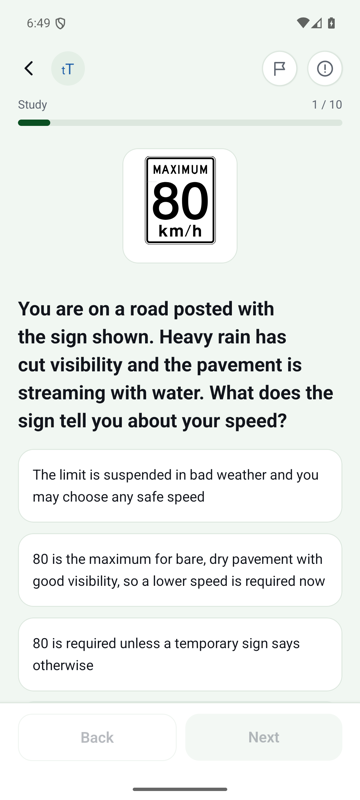
A sign question
The drawing, the question, and four options, one screen.
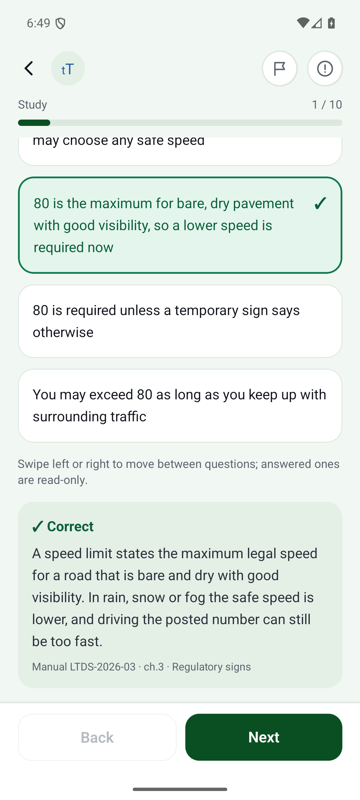
The explanation
Why the answer is the answer, and the chapter it came from.
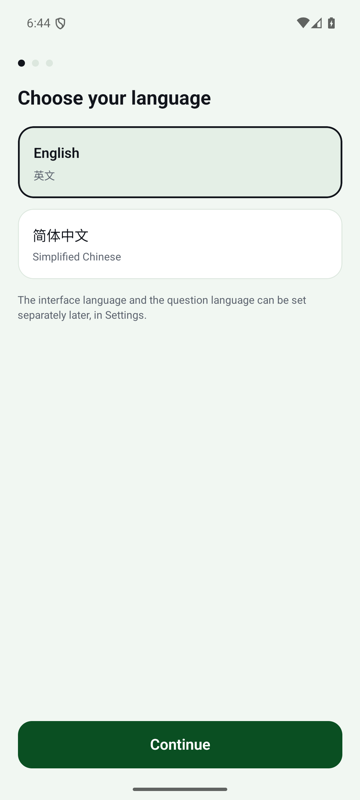
Two language settings
Interface language and question language are set separately.
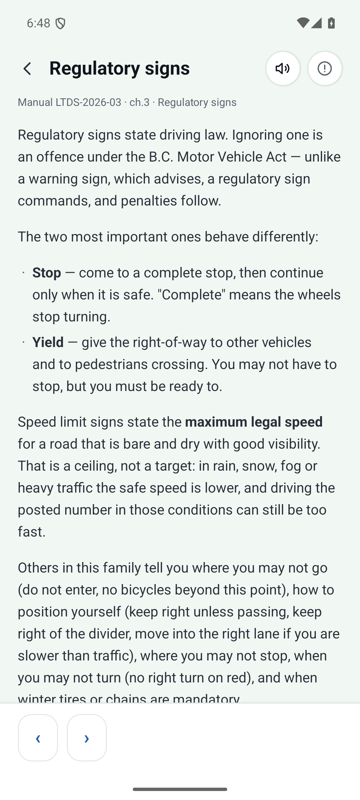
A concept card
The rule behind a group of questions, in one card.
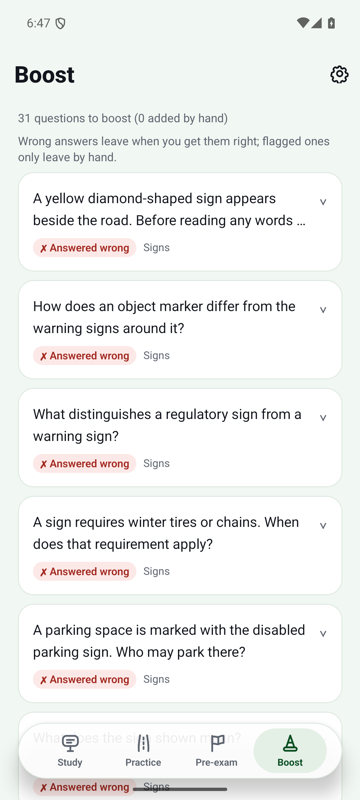
Boost
The questions you got wrong. Getting one right takes it off the list.
Getting the app
Android: install from Google Play, or download the app from this website. iPhone and iPad are in testing.
Google Play
The easiest way to install and update. Google Play keeps the app up to date for you.
Interface language and question language are set separately, so you can read the menus in 简体中文 and answer in English.
Right once, it’s out
Boost empties itself
Boost holds the questions you got wrong and any you added by hand. A practice round from Boost starts with the ones you know least well. The ones you added stay until you take them out.
Chapters 1–9
Every answer cites the manual
Each question names the manual chapter and section it was written from, so you can check any answer you disagree with.
No network needed
The app works with no network
The question bank ships inside the app. On a plane or in a basement, it opens straight into practice.
1700+ narrated clips
Read aloud in English, Simplified Chinese and Traditional Chinese
In the app, questions and explanations are read aloud in English, and in Mandarin from both the Simplified and the Traditional Chinese text, so you can practise with your eyes somewhere else.
Signing in is optional
Your answers stay on the phone unless you sign in
If you do not sign in, your answers and study progress are stored only on your device. Sign in if you want them on your other devices.
What unlocking opens, and what it costs
One subscription opens everything. The website and the Google Play version have the same listed prices.
A subscription opens
The remaining 13 question sets: 440+ questions in English, Simplified Chinese and Traditional Chinese, with explanations and narration
The concept cards for those sets, with narration
Unlimited mock exams and practice for weak areas
In the app, everything you download keeps working with no network
On the public question pages of this website, all questions are free to answer; they show only whether your answer is right or wrong. In the App, two question sets with explanations and narration are always free, along with their concept cards, all sign drawings, one mock exam per day, and the wrong-answer book, with no account needed and no time limit. The learning area on the website has the same two free sets, with their explanations and concept cards; you need an account to use them there.
On Android you can also subscribe inside the app through Google Play, at the same three prices. These renew automatically until you cancel and can be cancelled at any time in Google Play; Google Play adds any applicable tax at checkout. A subscription bought in the app (you sign in before you buy) also unlocks the learning area on this website, and one bought on this website also unlocks the app (version 0.5.0 or later) when you sign in to the same account.
Subscribing takes you to the learning area on this website, where you sign in and pay through a checkout that RevenueCat runs with Stripe. Our pages never receive your payment details. For now, we do not add tax to the listed prices for website purchases. Please confirm the final amount payable at checkout. Our address: support@vozai.com.
EVERY 3 MONTHSCAD 15.99Final total at checkoutabout CAD 0.18 a daySubscribe
MONTHLYCAD 6.99Final total at checkoutabout CAD 0.23 a daySubscribe
WEEKLYCAD 2.99Final total at checkoutabout CAD 0.43 a daySubscribe
All three open the same thing. They differ only in how often they renew. After you cancel, you can use the current period until it ends; it is not refunded.
Have a code? Codes are given away, not sold. Redeem one in the app (version 0.5.0 or later) or in the learning area after you sign in; it is then on your account and works in both.
Installed the app from this website? Version 0.6.0 and later can sign in with an email code and subscribe inside the app; there is no Google sign-in in this version. A subscription is tied to your account: it works in the learning area and in the app once you sign in to the same account. We no longer sell redemption codes.
How a code behaves, as the Terms of Service set it out
A code can only be redeemed once. Once used, it is spent.
Redeeming a second code extends your access rather than replacing it. Redeem a 1-week code while 5 days remain and you have 12 days, not 7.
A code redeemed in the app (version 0.5.0 or later) or on the website stays on your account. Deleting the app does not remove it: sign in again, on any phone. To redeem a code in the app, you must be signed in.
When access runs out, nothing is deleted. What you downloaded stays on the device, locked rather than gone, and the free sets keep working exactly as before.
Redemption codes are given away, not sold. They come in 1 week and 1 month, count from the moment you redeem them, and add up; a month ends on the same date of the next month, counted in UTC, or on that month's last day if it is shorter. Each code can be used once and has no cash value.
Redemption codes are free and are not refunded. The current subscription period is not refunded, whether you bought it in the app or on the website. If you delete your account, the time left on a subscription it bought on the website is forfeited and not refunded, and any time left on a cancelled subscription it bought through Google Play can no longer be used.
A purchase made inside the app through Google Play (app version 0.5.0 or later) is tied to the account you were signed in to when you bought it, not to your Google account. So is a subscription bought on the website. Sign in to that account on any device, in the app or on the website, to use it. After reinstalling the app or on a new phone, sign in to the same account first; if the purchase does not appear, tap Restore purchases on the purchase screen while signed in to that account. Restore purchases cannot move a purchase to a different account.
Questions people ask first
Is this ICBC's app?
No. We are not affiliated with ICBC or with the Government of British Columbia. Learn to Drive Smart is ICBC's publication and we study from it; this app and this website are an independent study aid based on it.
Will this tell me whether I am going to pass?
No, and anything that claims to is not being straight with you. Our questions are written by us and are not past exam papers. The app and the learning area tell you whether you are meeting their own standard. Whether you pass the real test is something we cannot tell you.
Do I need to be online?
For the learning area on this website, yes. The app needs a connection only to fetch new content, sign in, sync your records, redeem a code, or buy inside the app; its question bank is there from the moment you install it, and everything already downloaded keeps working whether or not our servers are up. Answering questions never waits for a connection: if you are signed in, your records are sent the next time you are online.
Can I read the menus in Chinese and answer in English?
Yes. That combination is what the app and the learning area were built for. Interface language and question language are two separate settings.
What happens if I delete the app?
If you unlocked the app with a code or bought inside the app through Google Play (app version 0.5.0 or later), the access is on your account: install the app again and sign in to the same account. If it does not appear after you sign in, tap Restore purchases on the purchase screen. Deleting the app does not cancel a subscription; cancel it where you bought it (Google Play, or your account page on the website).
How do I delete my account?
You can delete your account here, or in the app's settings. Deleting your account first stops the renewal of any subscription it bought on the website; the time left is forfeited and not refunded. If it has a subscription bought through Google Play, cancel that in Google Play first; the account cannot be deleted until then, and any time left on it can no longer be used afterwards. Deleting then removes your study records and your Google account ID. A phone still signed in to the account signs out the next time it goes online and removes the account's records from the phone. Delete account
Where do the questions come from?
From the current edition of Learn to Drive Smart, read by a person and turned into questions by a person. Each one records the chapter and section, and you can check any of them against the manual.
What we do not do
No pass predictions
Our questions are written by us; they are not past exam papers, and we have no basis for telling you whether you will pass.
No comparison with other learners
No leaderboards, no percentiles, no 「you scored better than 70% of users」. We do not compare your answers with anyone else's, in the app or on the website.
No account needed in the app
The app needs no sign-up, no email and no password to use. Without signing in, it keeps your progress on your phone; sign in if you want it on your other devices, or to redeem a code or buy a subscription. The learning area on the website needs an account.